Stream Deck Mini Protocol
Introduction
The Stream Deck Mini family are USB 2.0-compliant input devices featuring a compact 2×3 grid of keys atop a single LCD screen. They communicate with the host via the USB HID protocol, enabling key event reporting, image upload, and device configuration.
For all concepts, data types, report structures, and shared commands refer to the General Reference page. This page documents only what is specific to the Stream Deck Mini family.
The Mini family uses a different HID protocol from all other Stream Deck families. Report IDs, command bytes, input report structure, and image upload flow differ significantly. Do not assume compatibility with the General Reference commands.
Devices Overview
Summary
| Name | Model | VID | PID | Capabilities |
|---|---|---|---|---|
| Stream Deck 6-Key Module | 20GAI9901 | 0x0FD9 | 0x00B8 | 6 Key Layout |
| Stream Deck Mini | 20GAI9901 | 0x0FD9 | 0x0063 | 6 Key Layout |
| Stream Deck Mini 2022 | 20GAI9902 | 0x0FD9 | 0x0090 | 6 Key Layout |
| Stream Deck Mini Discord | 20GAI9901 | 0x0FD9 | 0x00B3 | 6 Key Layout |
All models in this family share the same HID command set and 6-key layout. Adjust the PID when targeting a specific model.
Capabilities & Physical Characteristics
6 Key Layout
| Entity | Property |
|---|---|
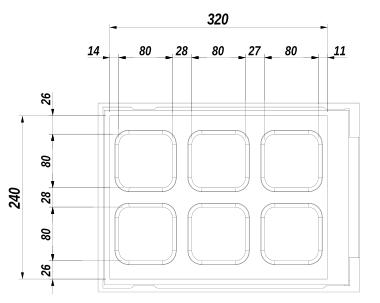
| LCD Image | 320 × 240 px (low DPI) |
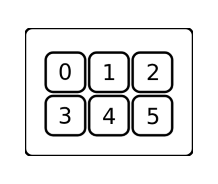
| Keys matrix | 3 × 2 |
| Key Image | 80 × 80 px |
Keypad Keys Index Layout
Unit Pixel Layout
Data Format
The Mini family shares the same basic data types and RGB Triplet definitions as all other Stream Deck families. The report structures below, however, differ from the general reference.
Input Report
Input reports transmit key press state change events from the device to the host. The host polls the device using a non-blocking HID READ command. The device returns a fixed 65-byte structure.
| Offset | Type | Note |
|---|---|---|
| + 0x00 | UINT8 | Report ID |
| + 0x01 | BYTE[] | Payload |
Output Report
Output reports transmit bulk data from the host to the device (e.g. images). The host sends these with HID WRITE. Each output report has a fixed size of 1024 bytes.
| Offset | Type | Note |
|---|---|---|
| + 0x00 | UINT8 | Report ID |
| + 0x01 | UINT8 | Command |
| + 0x02 | BYTE[] | Payload |
Feature Report
Feature reports set and retrieve device information or trigger commands. The host forms a structure with a maximum size of 32 bytes, zero-padded to fill.
- HID SEND FEATURE REPORT to send
- HID GET FEATURE REPORT to request a response
| Offset | Type | Note |
|---|---|---|
| + 0x00 | UINT8 | Report ID |
| + 0x01 | UINT8 | Command |
| + 0x02 | BYTE[] | Payload |
Command Descriptions
Input Reports
The host polls the device with HID READ. If no event is pending, HID READ returns TIMEOUT and the payload is undefined.
Key Press State Change
An event is generated on every change of key state. The payload contains one byte per key indicating its state.
| Offset | Type | Note |
|---|---|---|
| + 0x00 | Input Report | Report ID: 0x01 |
| + 0x01 | UINT8[64] | First 6 bytes used. Each byte is 0x00 (released) or 0x01 (pressed) |
Output Reports
Report ID: 0x02. Sent with HID WRITE. Multiple reports may be sent if data exceeds the maximum payload size.
Upload Data to Image Memory Bank
Uploads an image to the device's temporary storage memory bank, either for immediate display as a key image or for use by subsequent commands. The image must be split into chunks sized to fit the output report payload.
| Offset | Type | Note |
|---|---|---|
| + 0x00 | Output Report | Report ID: 0x02, Command: 0x01 |
| + 0x02 | UINT8 | Chunk Index |
| + 0x03 | UINT8 | Reserved: 0x00 |
| + 0x04 | UINT8 | Show Image flag |
| + 0x05 | UINT8 | Key Index |
| + 0x06 | BYTE[10] | Reserved: fill with 0x00 |
| + 0x10 | BYTE[] | Chunk Data |
Setter Feature Reports
Show Logo
Forcibly triggers the display of the boot logo.
| Offset | Type | Note |
|---|---|---|
| + 0x00 | Feature Report | Report ID: 0x0B, Command: 0x63 |
| + 0x02 | UINT8 | Show Boot Logo: 0x00 |
Set Backlight Brightness
Sets the LCD backlight brightness level.
| Offset | Type | Note |
|---|---|---|
| + 0x00 | Feature Report | Report ID: 0x05, Command: 0x55 |
| + 0x02 | UINT8 | 0xAA |
| + 0x03 | UINT8 | 0xD1 |
| + 0x04 | UINT8 | 0x01 |
| + 0x05 | UINT8 | Brightness Value |
Set Sleep Mode Duration
Sets the duration of idle time in seconds before the device enters Sleep Mode.
| Offset | Type | Note |
|---|---|---|
| + 0x00 | Feature Report | Report ID: 0x0B, Command: 0xA2 |
| + 0x02 | INT32 | Duration in seconds (set 0 to disable) |
Getter Feature Reports
Get Firmware Version
Requests the firmware version string of the device.
Request:
| Offset | Type | Note |
|---|---|---|
| + 0x00 | Feature Report | Report ID: see below |
Response:
| Offset | Type | Note |
|---|---|---|
| + 0x00 | UINT8 | Report ID: see below |
| + 0x01 | BYTE[4] | N/A |
| + 0x05 | UINT8[12] | Version String ASCII |
Report IDs by firmware type:
| Report ID | Name | Note |
|---|---|---|
| 0xA0 | LD | |
| 0xA1 | AP2 | Primary firmware |
| 0xA2 | AP1 | Backup firmware |
Get Unit Serial Number
Requests the unit's serial number string.
Request:
| Offset | Type | Note |
|---|---|---|
| + 0x00 | Feature Report | Report ID: 0x03 |
Response:
| Offset | Type | Note |
|---|---|---|
| + 0x00 | UINT8 | Report ID: 0x03 |
| + 0x01 | BYTE[4] | N/A |
| + 0x05 | UINT8[DataLength] | Serial Number String ASCII |
Get Sleep Mode Duration
Requests the configured idle duration before the device enters Sleep Mode.
Request:
| Offset | Type | Note |
|---|---|---|
| + 0x00 | Feature Report | Report ID: 0xA3 |
Response:
| Offset | Type | Note |
|---|---|---|
| + 0x00 | UINT8 | Report ID: 0xA3 |
| + 0x01 | UINT8 | Data Length |
| + 0x02 | INT32 | Duration |
The size of a Feature Report is fixed to 32 bytes.
Device Setup & Communication
Setup Connection
Open the device as a USB HID device. Once connected, the host can receive input events, upload images, and issue control commands.
Polling Input Controllers
The host should periodically poll the device with HID READ using a timed call. A TIMEOUT indicates that no key state changed.
Recommended polling period is 50ms.
Uploading Images
All images must be exported as BMP format before upload — unlike other Stream Deck families which use JPEG.
Key Image
- Prepare an
80 × 80 pximage. - Rotate the image
90° clockwisebefore upload. - Export as BMP format.
- Send using Upload Data to Image Memory Bank with
Show Image flagset to0x01and the target key index.
Full LCD Image
The Mini family does not support uploading a full LCD image in a single command. Instead, upload each key's LCD slice individually using the key image flow above.
- Prepare an
80 × 80 pximage per key slice. - Rotate the image
90° clockwisebefore upload. - Export as BMP format.
- Send using Upload Data to Image Memory Bank with
Show Image flagset to0x00for the target slice.
Closing Connection
Close the USB HID device handle.
Before closing the connection, it is good practice to use Show Logo to restore the default visual state.
INDEX
Input Reports Reference
| Report ID | Description |
|---|---|
0x01 | Key press state change |
Output Reports Reference
| Report ID | Command | Description |
|---|---|---|
0x02 | 0x01 | Upload Data to Image Memory Bank |
Feature Reports Reference
Setter Feature Reports
| Report ID | Command | Description |
|---|---|---|
0x0B | 0x63 | Show Logo |
0x05 | 0x55 | Set Backlight Brightness |
0x0B | 0xA2 | Set Sleep Mode Duration |
Getter Feature Reports
| Report ID | Description |
|---|---|
0xA0 | Get Firmware Version (LD) |
0xA1 | Get Firmware Version (AP2) |
0xA2 | Get Firmware Version (AP1) |
0x03 | Get Unit Serial Number |
0xA3 | Get Sleep Mode Duration |