Stream Deck +
Introduction
The Elgato Stream Deck + is a USB 2.0-compliant input device combining a 2×4 keypad, a touchscreen window, and 4 rotary encoders. It communicates with the host via the USB HID protocol, enabling key events, encoder events, touchscreen interaction, and image upload.
For all concepts, data types, report structures, and shared commands refer to the General Reference page. This page documents only what is specific to the Stream Deck +.
Device Overview
Summary
| Name | Model | VID | PID | Capabilities |
|---|---|---|---|---|
| Stream Deck + | 20GBD9901 | 0x0FD9 | 0x0084 | Stream Deck + Layout |
Capabilities & Physical Characteristics
Stream Deck + Layout
| Entity | Property(-ies) |
|---|---|
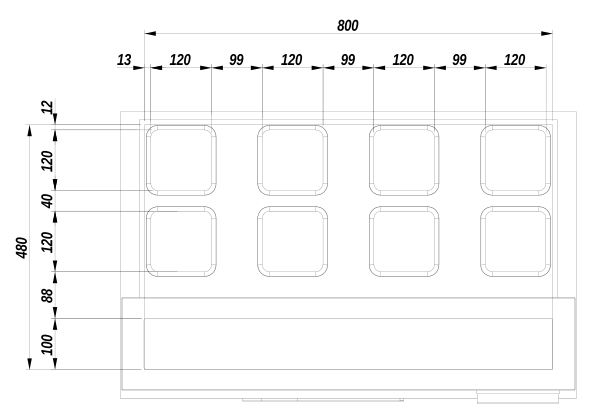
| LCD Image | 800 × 480 px, high DPI |
| Buttons matrix | 4 × 2 |
| Button Image | 120 × 120 px |
| Window | ✓ (touch capable) |
| Window Image | 800 × 100 px |
| Encoders | 4 |
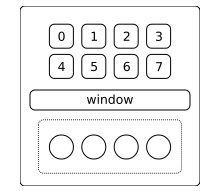
Keypad Buttons Index Layout
Unit Pixel Layout
Command Descriptions
Input Reports
The Report ID of input reports is 0x01.
Buttons Press State Change
An event is generated on every change of button state.
| Offset | Type | Note |
|---|---|---|
| + 0x00 | Input Report | Report ID: 0x01, Command: 0x00, Payload data length: number of buttons |
| + 0x04 | UINT8[] | Each byte has value 0x00 when depressed, or 0x01 when pressed |
Touch Screen Activity
Touch screen activity events are reported for interactions with the Stream Deck + window. The event is reported after the interaction completes — touch and release are not reported as separate events.
TAP
A short tap on the touchscreen window.
| Offset | Type | Note |
|---|---|---|
| + 0x00 | Input Report | Report ID: 0x01, Command: 0x02, Payload data length: 0x0A |
| + 0x04 | UINT8 | Contents type: 0x01 (TAP) |
| + 0x05 | UINT8 | Number of fingers: N/A |
| + 0x06 | UINT16 | Touch X-coordinate |
| + 0x08 | UINT16 | Touch Y-coordinate |
PRESS
A long tap (hold) on the touchscreen window.
| Offset | Type | Note |
|---|---|---|
| + 0x00 | Input Report | Report ID: 0x01, Command: 0x02, Payload data length: 0x0A |
| + 0x04 | UINT8 | Contents type: 0x02 (PRESS) |
| + 0x05 | UINT8 | Number of fingers: N/A |
| + 0x06 | UINT16 | Touch X-coordinate |
| + 0x08 | UINT16 | Touch Y-coordinate |
FLICK
A flick gesture on the touchscreen window.
| Offset | Type | Note |
|---|---|---|
| + 0x00 | Input Report | Report ID: 0x01, Command: 0x02, Payload data length: 0x0E |
| + 0x04 | UINT8 | Contents type: 0x03 (FLICK) |
| + 0x05 | UINT8 | Reserved: N/A |
| + 0x06 | UINT16 | Start touch X-coordinate |
| + 0x08 | UINT16 | Start touch Y-coordinate |
| + 0x0A | UINT16 | End touch X-coordinate |
| + 0x0C | UINT16 | End touch Y-coordinate |
Encoders State Change
An event is generated on every change of encoder state.
BTN
One or more encoder buttons changed press state.
| Offset | Type | Note |
|---|---|---|
| + 0x00 | Input Report | Report ID: 0x01, Command: 0x03, Payload data length: number of encoders + 1 |
| + 0x04 | UINT8 | Contents type: 0x00 (BTN) |
| + 0x05 | UINT8[] | Each byte has value 0x00 when depressed, or 0x01 when pressed |
ROTATE
One or more encoders were rotated.
| Offset | Type | Note |
|---|---|---|
| + 0x00 | Input Report | Report ID: 0x01, Command: 0x03, Payload data length: number of encoders + 1 |
| + 0x04 | UINT8 | Contents type: 0x01 (ROTATE) |
| + 0x05 | INT8[] | Each byte has a positive value for clockwise ticks, or a negative value for counter-clockwise ticks |
Output Reports
The Report ID of output reports is 0x02. When the payload does not fit into a single report, it must be split into multiple chunks.
Update Button Image
Uploads an image for a specific button.
| Offset | Type | Note |
|---|---|---|
| + 0x00 | Output Report | Report ID: 0x02, Command: 0x07 |
| + 0x02 | UINT8 | Button Index |
| + 0x03 | UINT8 | Transfer is Done flag (0x01 = last chunk) |
| + 0x04 | UINT16 | Chunk Contents Size |
| + 0x06 | UINT16 | Chunk Index (zero-based) |
| + 0x08 | UINT8[] | Chunk Data |
Update Full Screen Image
Uploads an image for the complete LCD.
| Offset | Type | Note |
|---|---|---|
| + 0x00 | Output Report | Report ID: 0x02, Command: 0x08 |
| + 0x02 | UINT8 | Reserved |
| + 0x03 | UINT8 | Transfer is Done flag (0x01 = last chunk) |
| + 0x04 | UINT16 | Chunk Contents Size |
| + 0x06 | UINT16 | Chunk Index (zero-based) |
| + 0x08 | UINT8[] | Chunk Data |
Update Window Image
Uploads a full image for the touchscreen window strip.
| Offset | Type | Note |
|---|---|---|
| + 0x00 | Output Report | Report ID: 0x02, Command: 0x0B |
| + 0x02 | UINT8 | Reserved |
| + 0x03 | UINT8 | Transfer is Done flag (0x01 = last chunk) |
| + 0x04 | UINT16 | Chunk Contents Size |
| + 0x06 | UINT16 | Chunk Index (zero-based) |
| + 0x08 | UINT8[] | Chunk Data |
Update Partial Window Image
Uploads an image into a rectangular region of the touchscreen window.
| Offset | Type | Note |
|---|---|---|
| + 0x00 | Output Report | Report ID: 0x02, Command: 0x0C |
| + 0x02 | UINT16 | X-coordinate |
| + 0x04 | UINT16 | Y-coordinate |
| + 0x06 | UINT16 | Image width |
| + 0x08 | UINT16 | Image height |
| + 0x0A | UINT8 | Transfer is Done flag (0x01 = last chunk) |
| + 0x0B | UINT16 | Chunk Index (zero-based) |
| + 0x0D | UINT16 | Chunk Contents Size |
| + 0x0F | UINT8 | Reserved |
| + 0x10 | UINT8[] | Chunk Data |
- Use logical coordinates, without accounting for image rotation.
Device Setup & Communication
Uploading Images
Button Image
- Prepare a
120 × 120 pximage. - No rotation required for Stream Deck + (
20GBD9901). - Export in JPEG format.
- Send using the Update Button Image command sequence.
Full LCD Image
- Prepare an
800 × 480 pximage. - No rotation required.
- Export in JPEG format.
- Send using the Update Full Screen Image command sequence.
Full Window Image
- Prepare an
800 × 100 pximage. - No rotation required.
- Export in JPEG format.
- Send using the Update Window Image command sequence.
Partial Window Image
- Prepare the image at the desired logical dimensions.
- No rotation required.
- Export in JPEG format.
- Send using the Update Partial Window Image command sequence.
INDEX
Input Reports Reference
| Report ID | Command | Description |
|---|---|---|
0x01 | 0x00 | Buttons press state change |
0x01 | 0x02 | Touch screen activity |
0x01 | 0x03 | Encoders state change |
Output Reports Reference
| Report ID | Command | Description |
|---|---|---|
0x02 | 0x07 | Update Button Image |
0x02 | 0x08 | Update Full Screen Image |
0x02 | 0x0B | Update Window Image |
0x02 | 0x0C | Update Partial Window Image |
Feature Reports Reference
Setter Feature Reports
| Report ID | Command | Description |
|---|---|---|
0x03 | 0x02 | Show Logo |
0x03 | 0x05 | Fill LCD with Color |
0x03 | 0x06 | Fill Button with Color |
0x03 | 0x08 | Set Backlight Brightness |
0x03 | 0x0D | Set Sleep Mode Duration |
Getter Feature Reports
| Report ID | Command | Description |
|---|---|---|
0x04 | Get Firmware Version (LD) | |
0x05 | Get Firmware Version (AP2) | |
0x06 | Get Unit Serial Number | |
0x07 | Get Firmware Version (AP1) | |
0x08 | Get Unit Information | |
0x0A | Get Sleep Mode Duration |